
Introduction
Welcome to our API for trading partners. This API allows for seamless integration of your systems with ours, allowing you to place orders, check the status of those orders, and receive shipping notifications through the use of webhooks. With this API, you will have real-time access to important information about your orders, enabling you to make more informed business decisions and improve your overall workflow.
The API is based on industry standards using REST in combination with the JSON data format and OAuth 2.0 for Authentication.
Key Features:
- RESTful API with JSON responses
- OAuth 2.0 authentication
- Real-time order tracking
- Webhook notifications
- Comprehensive error handling
Important: The API doesn't support bulk updates. You can work only on one entity per request.
Getting Started
Trading partners of this API must have an established account before they can start using this API. Your contact will guide you through the onboarding process and provide you with the information listed below that will be required for a successful integration with this API.
Prerequisites
- Valid trading partner account
- Client ID and Secret (provided during onboarding)
- Subscription keys for QA and Production environments
- Assigned API scopes and permissions
OAuth 2.0 Authentication
API clients will be authenticated using the OAuth 2.0 bearer schema. As a new client, work with your sales representative to define all operations you will need assigned to your account. These operations are also known as the 'scope'.
Once your credentials are created, you will be provided the scope(s), endpoint(s), client ID, shared secrets and subscription keys that will be used to retrieve a bearer token in both QA and Production.
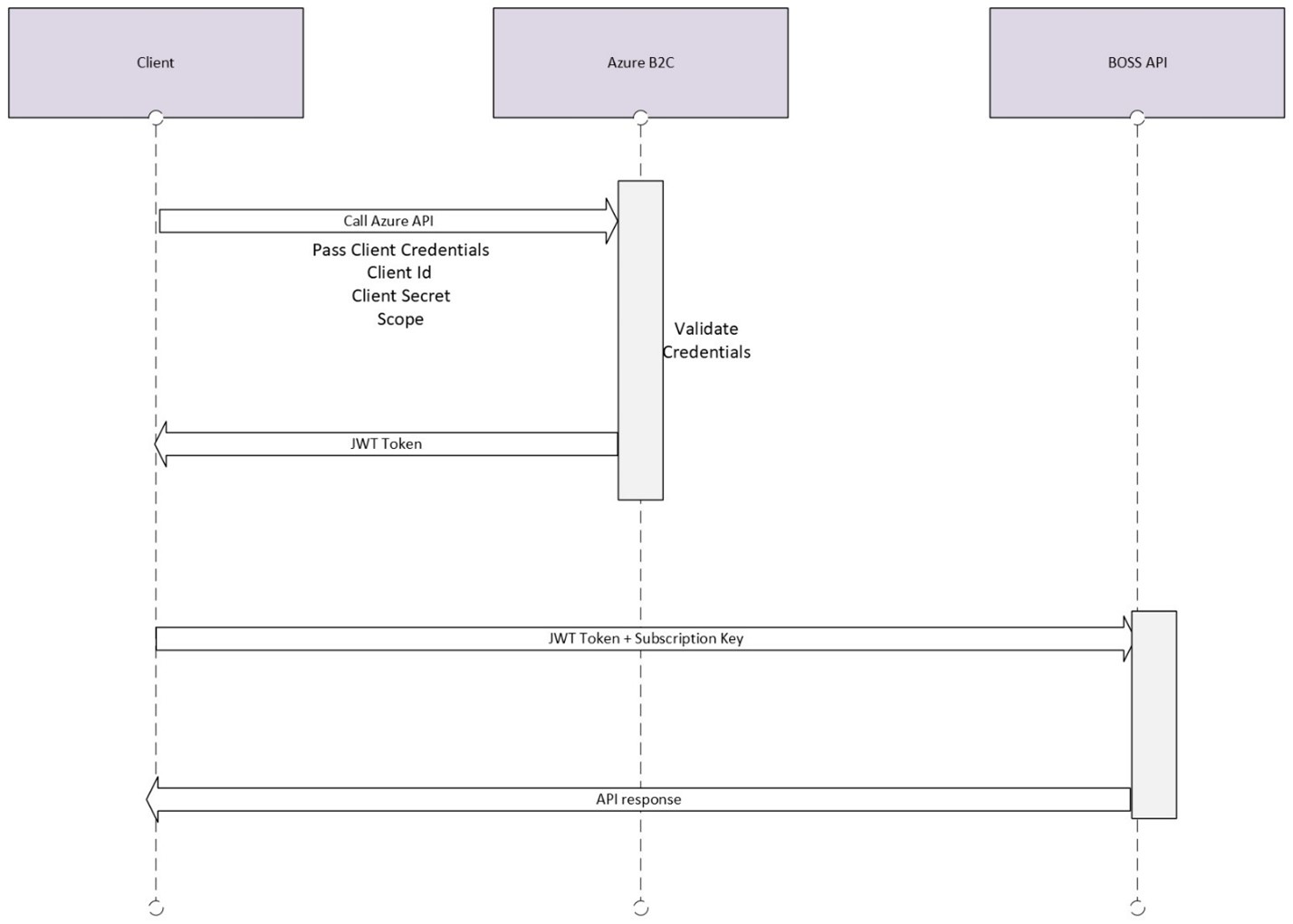
Authentication Flow
Access Token Request Details
Environment URLs
| Environment | Token Endpoint |
|---|---|
| Development | https://entappsloginnonprod.b2clogin.com/entappsloginnonprod.onmicrosoft.com/b2c_1_taylor_integrations/oauth2/v2.0/token |
| Production | https://login.orders.com/e940936e-3b4d-4248-9fb6-1ba0ad45fef6/b2c_1_taylor_integrations/oauth2/v2.0/token |
The service endpoints will by default support 120 requests per minute per client. Any request beyond that will return a 429 HTTP error.
Required Parameters
| Parameter | Description |
|---|---|
grant_type |
The only supported flow (value) is 'client_credentials' |
scope |
Environment specific URL with Application name
Non Prod https://entappsloginnonprod.onmicrosoft.com/BOSSCustomerApi/.default Productionhttps://entappsloginprod.onmicrosoft.com/BOSSCustomerApi/.default |
client_id |
Client Identifier (provided during onboarding process) |
client_secret |
Secret/Password (provided during onboarding process) |
Access Token Request Example
The examples below show how to request the JWT token. The property 'access_token' is what needs to be extracted from the JSON response. This value will be used in the Authorization header when calling the API endpoints.
The expiration of the tokens is defined in the field 'expires_in' (3600 = 1 hour). You will want to persist the token for its lifetime to make your application more performant.
cURL Example
curl --location --request POST 'https://entappsloginnonprod.b2clogin.com/entappsloginnonprod.onmicrosoft.com/b2c_1_taylor_integrations/oauth2/v2.0/token' \

--header 'Content-Type: application/x-www-form-urlencoded' \

--data-urlencode 'grant_type=client_credentials' \

--data-urlencode 'scope=https://entappsloginnonprod.onmicrosoft.com/BOSSCustomerApi/.default' \

--data-urlencode 'client_id=your-client-id' \

--data-urlencode 'client_secret=your-client-secret'
Response Example
{
    "access_token": "eyJhbGciOiJSUzI1NiIsImtpZCI6Ilg1ZVhrNHh5b2pORnVt...",
    "token_type": "Bearer",
    "not_before": 1729113649,
    "expires_in": 3600,
    "expires_on": 1729117249,
    "resource": "https://entappsloginnonprod.onmicrosoft.com/BOSSCustomerApi"
}
Subscription Key
The subscription key is provided during the onboarding process and is used in combination with the access_token when making a call against the API.
The cURL example below shows the use of the subscription key (Ocp-Apim-Subscription-Key) when performing a call against the API.
curl --location --request POST 'https://api-services-qa.taylorcorp.com/bossapi/v1/customers/1212/orders' \

--header 'Authorization: Bearer {{access_token}}' \

--header 'Ocp-Apim-Subscription-Key: your-subscription-key' \

--header 'Content-Type: application/json' \

--data-raw '{PAYLOAD}'
API Scopes
API scopes are used to define the level of access for specific resources. They serve as a security mechanism to restrict access to certain parts of the API. Scopes are defined in the Identity Service Provider and can be requested by the client during the authentication process.
Order Management
Operation: POST, PUT, DELETE (Submit, Update, Cancel Order)
Scope: order.create order.update order.cancel
Order Reading
Operation: GET (Read Order Details)
Scope: order.read
Product Information
Operation: GET (Read Product/SKU Information)
Scope: product.read sku.read
Organization Access
Operation: GET (Read Organization Details)
Scope: organization.read
Orders API
The Orders API provides comprehensive order management capabilities including creation, retrieval, updates, deletion, and configuration-based ordering.
Create Order
POST/customers/{customer_id}/orders
Create a new order by customer ID with detailed product configurations and customer information.
Request Schema - Standard Orders
POST /customers/{customer_id}/orders
Create a new order with product configurations and customer details.
Request Body Schema
| Parameter Name | Type | Description | Constraints |
|---|---|---|---|
| array[TaylorCorp.BOS.Global.Models.AssetModel] | Header level assets associated with the order. Currently only used for nowsource po orders | ||
auto_release
|
boolean | A flag determining whether the order should auto-release. Currently only on PO order. | Example: true |
bill_order_complete
|
boolean | Bill_order_complete property | Example: true |
| TaylorCorp.BOS.Global.Models.BillToModel | Bill_to property | ||
| array[TaylorCorp.BOS.Global.Models.OrderContactModel] | The contact person information for the order | ||
conversation_id
|
string | A GUID that will be used for tracking this order across the systems . | format: uuid Example: 123e4567-e89b-12d3-a456-426614174000 |
currency
|
string | The currency of the order. | Example: Sample text |
customer_buyer_number
|
string | The buyer number for the given order, tied to a name in TComs. Required for PO order. | Example: Sample text |
date
required
|
string | The date the order is placed. The max order number length is 18 and it cannot contain a "~" for Taylor Vend. | format: date-time Example: 2024-03-12T10:30:00Z |
expected_ship_date
|
string | The expected ship date the last vendor in the order will have the product shipped to the consumer. Currently only on PO order. | format: date-time Example: 2024-03-12T10:30:00Z |
| array[System.Collections.Generic.KeyValuePair_2__System.String__System.Private.CoreLib__Version_4.0.0.0__Culture_neutral__PublicKeyToken_7cec85d7bea7798e___System.String__System.Private.CoreLib__Version_4.0.0.0__Culture_neutral__PublicKeyToken_7cec85d7bea7798e__] | Here is the Key Value Pair List, such as [{"Key":"order_acknowledgement","Value":"N"}]. For TComs purchase orders, these are the mapped keys: ‘order_acknowledgement’, it should be like {"Key":"order_acknowledgement","Value":"N"}. | ||
gl_account_code
|
string | Header level GL Account Code. The default length max is 38 other validation TaylorVendAsciiAnnotation AsciiAnnotation. | Example: Sample text |
invoice_comments
|
string | Header level comments that will be printed on the invoice for the customer.Currently only on PO order. | Example: Sample text |
| array[TaylorCorp.BOS.Global.Models.ItemModel] | An array of items for the order. | ||
| array[TaylorCorp.BOS.Global.Models.KitModel] | An optional array of kits to indicate which items are kitted together. If an item is part of a kit, the shipping is added to the kit and not the items since they are all shipped to the same location. | ||
mfg_order_number
|
string | The manufacturer number for the order | Example: Sample text |
order_comments
|
string | Header level comments on the order for the Billing / internal Tcoms teams. Not used externally. Currently only on PO order. | Example: Sample text |
order_number
required
|
string | The Inbound OrderNumber from a commerce platform | Example: Sample text |
| array[TaylorCorp.BOS.Global.Models.PaymentModel] | An array of payment models. Currently only supporting 1 optional credit_card model per order. | ||
po_number
|
string | The po number of the order. If not provided for Taylor Vend - the order_number will be used as the po_number. The max po size for Taylor Vend is 30. | Example: Sample text |
previous_order_number
|
string | The previous order number used by the manufacturer | Example: Sample text |
proofs_quantity
|
string | The number of proofs a csr has requested before the order is produced. Currently only on PO order. | Example: Sample text |
quote_date
|
string | The date the quote for the purchase order was created. Currently only on PO order. | format: date-time Example: 2024-03-12T10:30:00Z |
quote_reference
|
string | The reference number for a quoted purchase order. Currently only on PO order. | Example: Sample text |
| TaylorCorp.BOS.Global.Models.ShippingChargeModel | Shipping_charge property | ||
status
|
string | Status of order such as change, new or delete | Example: Sample text |
| TaylorCorp.BOS.Global.Models.SubmittedByModel | Submitted_by property | ||
| TaylorCorp.BOS.Global.Models.TaxModel | Tax property | ||
total
required
|
integer | The total price of the order, two decimal places are assumed. | format: int64 Example: 42 |
Get Order
GET/customers/{customer_id}/orders/{order_number}
Retrieve detailed information about a specific order by customer ID and order number.
Update Order
PATCH/customers/{customer_id}/orders/{order_number}
Update an existing order using JSON Patch operations. Allows partial updates to order details.
Delete Order
DELETE/customers/{customer_id}/orders/{order_number}
Cancel/delete an order by customer ID and order number.
Order with Configurations
POST/customers/{customer_id}/OrderConfigurations
Create orders with advanced product configurations. Specialized endpoint for complex manufacturing requirements.
Request Schema - Order Configurations
POST /customers/{customer_id}/OrderConfigurations
POST /customers/{customer_id}/orders
Create orders with advanced product configurations. User has option to provide complex manufacturing requirements with detailed configuration options.
User can use either Orders endpoint or OrderConfigurations endpoint to create orders.
Request Body Schema
| Parameter Name | Type | Description | Constraints |
|---|---|---|---|
| array[BOSS.Api.Models.Models.AssetModel] | Header level assets associated with the order. Currently only used for nowsource po orders | ||
auto_release
|
boolean | A flag determining whether the order should auto-release. Currently only on PO order. | Example: true |
bill_order_complete
|
boolean | Bill_order_complete property | Example: true |
| BOSS.Api.Models.Models.BillToModel | Bill_to property | ||
conversation_id
|
string | A GUID that will be used for tracking this order across the systems . | format: uuid Example: 123e4567-e89b-12d3-a456-426614174000 |
currency
|
string | The currency of the order. | Example: Sample text |
customer_buyer_number
|
string | The buyer number for the given order, tied to a name in TComs. Required for PO order. | Example: Sample text |
date
|
string | The date the order is placed. The max order number length is 18 and it cannot contain a "~" for Taylor Vend. | format: date-time Example: 2024-03-12T10:30:00Z |
expected_ship_date
|
string | The expected ship date the last vendor in the order will have the product shipped to the consumer. Currently only on PO order. | format: date-time Example: 2024-03-12T10:30:00Z |
| array[System.Collections.Generic.KeyValuePair_2__System.String__System.Private.CoreLib__Version_4.0.0.0__Culture_neutral__PublicKeyToken_7cec85d7bea7798e___System.String__System.Private.CoreLib__Version_4.0.0.0__Culture_neutral__PublicKeyToken_7cec85d7bea7798e__] | Here is the Key Value Pair List, such as [{"Key":"order_acknowledgement","Value":"N"}]. For TComs purchase orders, these are the mapped keys: ‘order_acknowledgement’, it should be like {"Key":"order_acknowledgement","Value":"N"}. | ||
invoice_comments
|
string | Header level comments that will be printed on the invoice for the customer.Currently only on PO order. | Example: Sample text |
| array[BOSS.Api.Models.Models.ItemConfigurationModel] | An array of items for the order. | ||
| array[BOSS.Api.Models.Models.KitModel] | An optional array of kits to indicate which items are kitted together. If an item is part of a kit, the shipping is added to the kit and not the items since they are all shipped to the same location. | ||
mfg_order_number
|
string | The manufacturer number for the order | Example: Sample text |
order_comments
|
string | Header level comments on the order for the Billing / internal Tcoms teams. Not used externally. Currently only on PO order. | Example: Sample text |
order_number
|
string | The Inbound OrderNumber from a commerce platform | Example: Sample text |
| array[BOSS.Api.Models.Models.PaymentModel] | An array of payment models. Currently only supporting 1 optional credit_card model per order. | ||
po_number
|
string | The po number of the order. If not provided for Taylor Vend - the order_number will be used as the po_number. The max po size for Taylor Vend is 30. | Example: Sample text |
previous_order_number
|
string | The previous order number used by the manufacturer | Example: Sample text |
proofs_quantity
|
string | The number of proofs a csr has requested before the order is produced. Currently only on PO order. | Example: Sample text |
quote_date
|
string | The date the quote for the purchase order was created. Currently only on PO order. | format: date-time Example: 2024-03-12T10:30:00Z |
quote_reference
|
string | The reference number for a quoted purchase order. Currently only on PO order. | Example: Sample text |
| BOSS.Api.Models.Models.ShippingModel | Shipping property | ||
| BOSS.Api.Models.Models.ShippingChargeModel | Shipping_charge property | ||
| BOSS.Api.Models.Models.SubmittedByModel | Submitted_by property | ||
| BOSS.Api.Models.Models.TaxModel | Tax property | ||
total
|
integer | The total price of the order, two decimal places are assumed. | format: int64 Example: 42 |
Order Notification Webhooks
BOSS Webhooks provide outbound status notifications from the BOSS platform to customer endpoints. This section summarizes supported delivery and authentication models so integration teams can quickly select the right approach and provide the required onboarding details.
Integration Overview
BOSS Webhooks notifications are delivered over HTTP(S) as outbound POST requests from BOSS to your endpoint.
Key principles
- All integrations are outbound from BOSS to your endpoint
- Authentication is applied at the HTTP request level
- Endpoints should return HTTP 200 for successful processing
Supported Webhook Events:
- OrderNotificationReceived - Triggered when an order is successfully received and validated
- OrderNotificationShipped - Triggered when an order has been shipped with tracking information
Supported Authentication Methods
- No Authentication: Use only in restricted network environments. Required: endpoint URL.
- Basic Authentication: Base64-encoded username/password in Authorization header over HTTPS. Required: endpoint URL, username, password.
- Static HTTP Header Authentication: Fixed header/value pair (for example, x-api-key). Required: endpoint URL, header name, header value.
- OAuth 2.0: Bearer token retrieved from customer-provided auth service. Supports configurations with or without refresh tokens.
- JWT Bearer Authentication: Time-bound signed JWT token in Authorization header.
- SFTP Delivery: File-based delivery via
sftp://<username>@<host>[:port]/<folder-path>. Username/password supported; SSH key authentication is not supported.
Security & Technical Requirements
- HTTPS and TLS 1.2+ are required for webhook endpoints
- Token-based authentication (OAuth or JWT) is recommended when available
- Static credentials should be rotated periodically
- Avoid exposing unauthenticated public endpoints
Getting Started
Request Webhook Integration- Select an authentication method from the supported options
- Provide required configuration details for onboarding
- Share endpoint and credentials securely with the integration team
- Coordinate validation and end-to-end testing
Order Received Notification
POSThttps://{Client API endpoint}/webhooks
Sent when an order is successfully received, validated, and entered into our production system.
Request Body Schema - OrderNotificationReceived
| Parameter Name | Type | Description & Example |
|---|---|---|
webhookType
|
string |
Type of webhook event being sent
Example:
OrderNotificationReceived |
timestamp
|
string (datetime) |
ISO 8601 timestamp when the event occurred
Example:
2024-03-16T09:15:00.000Z |
eventId
|
string |
Unique identifier for this specific webhook event
Example:
recv-12345-67890 |
apiVersion
|
string |
Version of the webhook API format
Example:
v1 |
| object |
Main payload containing order information
Example:
Object with 12 properties |
|
| object |
Technical metadata about webhook delivery
Example:
Object with 4 properties |
View Raw JSON Payload
{
  "webhookType": "OrderNotificationReceived",
  "timestamp": "2024-03-16T09:15:00.000Z",
  "eventId": "recv-12345-67890",
  "apiVersion": "v1",
  "data": {
    "orderNumber": "ORD-2024-001234",
    "customerId": "12345",
    "customerReference": "CUST-REF-789",
    "orderStatus": "Received",
    "orderReceivedDate": "2024-03-16T09:15:00.000Z",
    "estimatedCompletionDate": "2024-03-20T17:00:00.000Z",
    "orderDetails": {
      "priority": "Standard",
      "rushOrder": false,
      "proofRequired": true,
      "specialInstructions": "Please review artwork carefully before production"
    },
    "billingInformation": {
      "paymentMethod": "CreditCard",
      "paymentStatus": "Authorized",
      "billingAddress": {
        "name": "John Smith",
        "company": "ABC Company",
        "address1": "123 Main Street",
        "address2": "Suite 100",
        "city": "Minneapolis",
        "state": "MN",
        "postalCode": "55401",
        "country": "US"
      }
    },
    "shippingAddress": {
      "name": "John Smith",
      "company": "ABC Company",
      "address1": "123 Main Street",
      "address2": "Suite 100",
      "city": "Minneapolis",
      "state": "MN",
      "postalCode": "55401",
      "country": "US"
    },
    "items": [
      {
        "itemId": "ITEM-001",
        "sku": "BC-500-WHT",
        "productName": "Business Cards - Standard White",
        "quantity": 500,
        "unitPrice": 25.99,
        "totalPrice": 25.99,
        "configurations": {
          "size": "3.5x2",
          "paperType": "14pt Cardstock",
          "finish": "Matte",
          "sides": "Double-sided",
          "artwork": {
            "fileUrl": "https://artwork.yourcompany.com/files/artwork-12345.pdf",
            "fileName": "business-card-design.pdf",
            "fileSize": "2.4MB",
            "artworkStatus": "Pending Review"
          }
        }
      }
    ],
    "orderTotals": {
      "subtotal": 25.99,
      "tax": 2.08,
      "shipping": 7.95,
      "discount": 0,
      "total": 35.02,
      "currency": "USD"
    },
    "processingTimeline": {
      "proofingPhase": {
        "estimatedStart": "2024-03-16T14:00:00.000Z",
        "estimatedCompletion": "2024-03-17T12:00:00.000Z"
      },
      "productionPhase": {
        "estimatedStart": "2024-03-17T14:00:00.000Z",
        "estimatedCompletion": "2024-03-19T16:00:00.000Z"
      },
      "shippingPhase": {
        "estimatedStart": "2024-03-19T18:00:00.000Z",
        "estimatedDelivery": "2024-03-21T17:00:00.000Z"
      }
    }
  },
  "webhookMetadata": {
    "retryCount": 0,
    "webhookUrl": "https://your-endpoint.com/webhooks/order-notifications",
    "signature": "sha256=b4c3d2e1f0g9h8i7j6k5l4m3n2o1p0q9",
    "deliveryId": "delivery-uuid-67890"
  }
}
Order Shipped Notification
POSThttps://your-webhook-endpoint.com/webhooks
Sent when an order has been completed, packaged, and shipped with tracking information.
Request Body Schema - OrderNotificationShipped
| Parameter Name | Type | Description & Example |
|---|---|---|
webhookType
|
string |
Type of webhook event being sent
Example:
OrderNotificationShipped |
timestamp
|
string (datetime) |
ISO 8601 timestamp when the event occurred
Example:
2024-03-16T14:30:00.000Z |
eventId
|
string |
Unique identifier for this specific webhook event
Example:
ship-12345-67890 |
apiVersion
|
string |
Version of the webhook API format
Example:
v1 |
| object |
Main payload containing order information
Example:
Object with 8 properties |
|
| object |
Technical metadata about webhook delivery
Example:
Object with 4 properties |
View Raw JSON Payload
{
  "webhookType": "OrderNotificationShipped",
  "timestamp": "2024-03-16T14:30:00.000Z",
  "eventId": "ship-12345-67890",
  "apiVersion": "v1",
  "data": {
    "orderNumber": "ORD-2024-001234",
    "customerId": "12345",
    "customerReference": "CUST-REF-789",
    "orderStatus": "Shipped",
    "shippingInformation": {
      "trackingNumber": "1Z999AA1234567890",
      "carrier": "UPS",
      "carrierService": "UPS Ground",
      "shippedDate": "2024-03-16T12:00:00.000Z",
      "estimatedDeliveryDate": "2024-03-18T17:00:00.000Z",
      "shippingAddress": {
        "name": "John Smith",
        "company": "ABC Company",
        "address1": "123 Main Street",
        "address2": "Suite 100",
        "city": "Minneapolis",
        "state": "MN",
        "postalCode": "55401",
        "country": "US"
      },
      "trackingUrl": "https://www.ups.com/track?tracknum=1Z999AA1234567890"
    },
    "items": [
      {
        "itemId": "ITEM-001",
        "sku": "BC-500-WHT",
        "productName": "Business Cards - Standard White",
        "quantity": 500,
        "unitPrice": 25.99,
        "totalPrice": 25.99,
        "specifications": {
          "size": "3.5x2",
          "paperType": "14pt Cardstock",
          "finish": "Matte",
          "sides": "Double-sided"
        }
      }
    ],
    "orderTotals": {
      "subtotal": 25.99,
      "tax": 2.08,
      "shipping": 7.95,
      "total": 35.02,
      "currency": "USD"
    },
    "manufacturingDetails": {
      "productionFacility": "Minneapolis Production Center",
      "productionDate": "2024-03-15T10:30:00.000Z",
      "qualityCheckPassed": true,
      "specialInstructions": "Rush processing requested"
    }
  },
  "webhookMetadata": {
    "retryCount": 0,
    "webhookUrl": "https://your-endpoint.com/webhooks/order-notifications",
    "signature": "sha256=a3b2c1d4e5f6g7h8i9j0k1l2m3n4o5p6",
    "deliveryId": "delivery-uuid-12345"
  }
}
Product Specifications
This section provides comprehensive information about product features, artwork requirements, and detailed specifications for various product types available through our API.
Section Contents:
- Product Features and Samples
- Artwork Submission Methods
- Social Stationery Specifications
- Office Supplies Specifications
- Home & Office Product Specifications
- Napkins & Coasters Specifications
- Drinkware Product Specifications
- Gifts Product Specifications
- Pet Products Specifications
- Decal Art Product Specifications
- Wall Art Product Specifications
- Signs and Graphics Product Specifications
- Custom Product Configuration
Product Features and Samples
The Super Model Item Specification can be used for all product types, but each product may have small variations in options or configuration. This section lists all supported products and describes the specifications for each product in detail.
An item model on the order can have a child 'configuration' object that represents the product type the item is and contains all variable information required for manufacturing. If the item is not personalized and does not require configuration, this child configuration model will be left as null and the item will be processed as normal. Most personalized orders will use the super_model configuration. This configuration model contains a generic structure for a product with one or more parts, surfaces, and images.
Available Product Categories
Flat note cards, invitations, announcements
Post-It notes, cubes, lint sheet packs
Mousepads, notebooks, planners, stamps
Mugs, tumblers, glasses, water bottles
Baby bibs, burp clothes, baby blankets
Custom printed napkins with digital/foil options
Custom printed coasters with digital printing
Acrylic, metal, foam board, poster wall art
Yard signs, foam boards, magnets, table tents
Durable, mesh, pennant, display, retractable banners
Window decals, wall decals, floor decals
Dog leashes, collars, beds, tags, bowls, mats, bandanas
Artwork Submission
There are two methods for passing in artwork via the Taylor BOSS API, either each surface is it's own defined asset (single page per asset) or there is one asset with define page numbers (multipage). The standard file format is a .pdf file, however, certain products may require different file types.
📋 Important Note
Please check with your Taylor Project Manager to confirm artwork specification for desired product types, as certain products may require different file formats or specifications.
Single Page Assets
Each surface is defined as its own asset with one page per asset. This method provides precise control over individual surfaces.
- One asset per printing surface
- Ideal for simple designs
- Clear surface-to-asset mapping
Multipage Assets
One asset contains multiple pages with defined page numbers for each surface. Suitable for complex multi-surface products.
- Single asset with multiple pages
- Page number references for surfaces
- Efficient for complex products
Social Stationery
Social stationery products include a variety of personalized items for events, announcements, and professional correspondence. Each product type has specific configuration requirements detailed below.
📋 Social Stationery Products
Single or double-sided cards with kitting model
Cards with horizontal/vertical fold options
Address positioning: Flap, Center, or Return
Professional cards with digital print process
Restaurant menus with fold configuration
Promotional flyers with fold options
Flat Note Cards
Flat Note Cards print on one or two surface(s). You will only need to define the number of surfaces being printed on that card. If only one is printed, define surface 1, but add surface 2 if the back is printed as well.
Configuration Requirements
When using the super model to send flat note cards, you will need to use a kitting model to include the envelopes with the cards. See the JSON sample for the specifics of the kitted model.
While you will not need to define extrinsic fields, you will need to define the print_process. If you have multiple surfaces, "digital" must always be surface one.
| Surface | Description | Print Process | Required |
|---|---|---|---|
| Surface 1 | Front of the card | digital |
✅ Always required |
| Surface 2 | Back of the card (if printed) | digital |
⚪ Optional |
Sample Image
Folded Notecards
Folded Cards print on one or two surface(s). You will only need to define the number of surfaces being printed on that card. If only one is printed, define surface 1, but add surface 2 if the back is printed as well.
Configuration Requirements
When using the super model to send folded note cards, you will need to use a kitting model to include the envelopes with the cards. See the JSON sample for the specifics of the kitted model.
You will need to define an extrinsic field for the fold direction. This will be either "horizontal" or "vertical".
You will need to define the print_process field. If you have multiple surfaces, "digital" must always be surface one.
| Surface | Description | Print Process | Fold Options | Required |
|---|---|---|---|---|
| Surface 1 | Front of the folded card | digital |
horizontal or vertical |
✅ Always required |
| Surface 2 | Back of the card (if printed) | digital |
Same as Surface 1 | ⚪ Optional |
Sample Image
Envelopes
Envelopes print on one or two surface(s) as shown in the picture below. You will only need to define the number of surfaces being printed on that envelope. If only one side is printed, define surface 1, but add surface 2 if the back is printed as well. While you will define an extrinsic field for the position of the address, this will either be "Flap", "Center" or "Return". You will also need to define the print_process field. If you have multiple surfaces, "digital" must always be used for envelopes.
Configuration Requirements
You will need to define an extrinsic field for the address position. This will be either "Flap", "Center", or "Return".
You will need to define the print_process field. If you have multiple surfaces, "digital" must always be used for envelopes.
| Surface | Description | Print Process | Address Position | Required |
|---|---|---|---|---|
| Surface 1 | Front of the envelope | digital |
Flap, Center, or Return |
✅ Always required |
| Surface 2 | Back of the envelope (if printed) | digital |
Same as Surface 1 | ⚪ Optional |
Sample Image
Business Cards
Business Cards print on one or two surface(s) as shown in the picture below. You will only need to define the number of surfaces being printed on that business card. If only one side is printed, define surface 1, but add surface 2 if the back is printed as well. You will also need to define the print_process field. If you have multiple surfaces, "digital" must always be used for business cards.
Configuration Requirements
You will need to define the print_process field. If you have multiple surfaces, "digital" must always be used for business cards.
| Surface | Description | Print Process | Required |
|---|---|---|---|
| Surface 1 | Front of the business card | digital |
✅ Always required |
| Surface 2 | Back of the business card (if printed) | digital |
⚪ Optional |
Sample Image
Menus
Menus print on one or two surface(s) as shown in the picture below. You will only need to define the number of surfaces being printed on that menu. If only one side is printed, define surface 1, but add surface 2 if the back is printed as well. You will define an extrinsic field for the fold, this will either be "horizontal" or "vertical". You will also need to define the print_process field. If you have multiple surfaces, "digital" must always be the surface one.
Configuration Requirements
You will need to define an extrinsic field for the fold direction. This will be either "horizontal" or "vertical".
You will need to define the print_process field. If you have multiple surfaces, "digital" must always be surface one.
| Surface | Description | Print Process | Fold Options | Required |
|---|---|---|---|---|
| Surface 1 | Front of the menu | digital |
horizontal or vertical |
✅ Always required |
| Surface 2 | Back of the menu (if printed) | digital |
Same as Surface 1 | ⚪ Optional |
Sample Image
Flyers
Flyers print on one or two surface(s) as shown in the picture below. You will only need to define the number of surfaces being printed on that flyer. If only one side is printed, define surface 1, but add surface 2 if the back is printed as well. You will define an extrinsic field for the fold, this will either be "horizontal" or "vertical". You will also need to define the print_process field. If you have multiple surfaces, "digital" must always be the surface one.
Configuration Requirements
You will need to define an extrinsic field for the fold direction. This will be either "horizontal" or "vertical".
You will need to define the print_process field. If you have multiple surfaces, "digital" must always be surface one.
| Surface | Description | Print Process | Fold Options | Required |
|---|---|---|---|---|
| Surface 1 | Front of the flyer | digital |
horizontal or vertical |
✅ Always required |
| Surface 2 | Back of the flyer (if printed) | digital |
Same as Surface 1 | ⚪ Optional |
Sample Image
Office Supplies
Office supplies include essential business items and promotional products for workplace environments. Each product type has specific configuration requirements and supplier SKU specifications detailed below.
🏢 Office Supplies Products
Single surface, requires supplier SKU
Four surfaces with digital print process
Custom printed, requires supplier SKU
Post-It Notes
Post-It Notes print on one surface as shown in the picture below. You will only need to define one surface and one area in the super model. When using the super model to send Post-It notes, you will not need to define extrinsic fields, but you will need to define the print_process field as "digital". You must also include the supplier sku, which will let Taylor know which size and style you are ordering.
Configuration Requirements
You will need to define the print_process field as "digital".
You must include the supplier SKU, which will let Taylor know which size and style you are ordering.
Define only one surface and one area in the super model. No extrinsic fields required.
| Surface | Description | Print Process | Supplier SKU | Required |
|---|---|---|---|---|
| Surface 1 | Front of the Post-It note | digital |
✅ Required for size/style | ✅ Always required |
Sample Image
Post-It Cube
Post-It Cubes print on four surfaces as shown in the picture below. You will need to define the number of surfaces being printed on that cube. If only one side is printed, define surface 1, but add surface 2, surface 3, and surface 4 for all the other sides. You will also need to define the print_process field. If you have multiple surfaces, "digital" must always be the surface one.
Configuration Requirements
You will need to define the print_process field. If you have multiple surfaces, "digital" must always be surface one.
Define up to four surfaces. Add surface 2, surface 3, and surface 4 for additional printed sides of the cube.
| Surface | Description | Print Process | Required |
|---|---|---|---|
| Surface 1 | First side of the cube | digital |
✅ Always required |
| Surface 2 | Second side of the cube | digital |
⚪ Optional |
| Surface 3 | Third side of the cube | digital |
⚪ Optional |
| Surface 4 | Fourth side of the cube | digital |
⚪ Optional |
Sample Image
Custom Printed Lint Sheets Pocket Pack
Custom Printed Lint Sheets Pocket Pack print on one surface as shown in the picture below. You will only need to define one surface and one area in the super model. When using the super model to send Custom Printed Lint Sheets Pocket Packs, you will not need to define extrinsic fields, but you will need to define the print_process field as "digital". You must also include the supplier sku, which will let Taylor know which size and style you are ordering.
Configuration Requirements
You will need to define the print_process field as "digital".
You must include the supplier SKU, which will let Taylor know which size and style you are ordering.
Define only one surface and one area in the super model. No extrinsic fields required.
| Surface | Description | Print Process | Supplier SKU | Required |
|---|---|---|---|---|
| Surface 1 | Front of the lint sheet pack | digital |
✅ Required for size/style | ✅ Always required |
Sample Image
Need Assistance?
For detailed product specifications, artwork requirements, or configuration assistance, please contact your Taylor Project Manager or the integrations team.
Contact Integration TeamHome & Office
Home & Office products include essential items for personal and professional use. Each product type has specific configuration requirements and supplier SKU specifications detailed below.
🏠 Home & Office Products
Single surface, requires supplier SKU
Content & spiral color configuration
Dated/undated with spiral options
Offset print process
Offset print process
Offset print process
Mousepads
Mousepads print on one surface as shown in the picture below. You will only need to define one surface and one area in the super model. When using the super model to send Mousepads, you will not need to define extrinsic fields, but you will need to define the print_process field as "digital". You must also include the supplier sku, which will let Taylor know which size and style you are ordering.
Configuration Requirements
You will need to define the print_process field as "digital".
You must include the supplier SKU, which will let Taylor know which size and style you are ordering.
Sample Image
Notebooks
Notebooks print on one or two surface(s) as shown in the picture below. You will only need to define the number of surfaces being printed on that notebook. If only one is printed, define surface 1, but add surface 2 if the back is printed as well. You will define an extrinsic field for the content of the notebook, this will either be "COLLEGE" or "BLANK", or "WIDE", or "CHECKLIST", "SKETCH", or "BULLET" or "RECIPE". The spiral color will also need to be added into the extrinsics field for "spiral" with either "BLK" for Black or "GLD" for Gold. You will also need to define the print_process field. If you have multiple surfaces, "digital" must always be the surface one.
Configuration Requirements
Content: "COLLEGE", "BLANK", "WIDE", "CHECKLIST", "SKETCH", "BULLET", or "RECIPE"
Spiral: "BLK" for Black or "GLD" for Gold
If you have multiple surfaces, "digital" must always be surface one.
Sample Image
Planners
Planners print on one or two surface(s) as shown in the picture below. You will only need to define the number of surfaces being printed on that planner. If only one side is printed, define surface 1, but add surface 2 if the back is printed as well. You will define an extrinsic field for the content of the notebook, this will either be "DATED" or "UNDATED". The spiral color will also need to be added into the extrinsics field for "spiral" with either "BLK" for Black or "GLD" for Gold. You will also need to define the print_process field. If you have multiple surfaces, "digital" must always be the surface one.
Configuration Requirements
Content: "DATED" or "UNDATED"
Spiral: "BLK" for Black or "GLD" for Gold
If you have multiple surfaces, "digital" must always be surface one.
Sample Image
Self-Inking Stamps
Self-Inking Stamps print on one surface as shown in the picture below. You will only need to define one surface and one area in the super model. When using the super model to send stamps, you will not need to define extrinsic fields, but you will need to define the print_process field as "offset". You must also include the supplier sku, which will let Taylor know which size and style you are ordering.
Configuration Requirements
You will need to define the print_process field as "offset".
You must include the supplier SKU, which will let Taylor know which size and style you are ordering.
Sample Image
Self-Inking Daters
Self-Inking daters print on one surface as shown in the picture below. You will only need to define one surface and one area in the super model. When using the super model to send stamps, you will not need to define extrinsic fields, but you will need to define the print_process field as "offset". You must also include the supplier sku, which will let Taylor know which size and style you are ordering.
Configuration Requirements
You will need to define the print_process field as "offset".
You must include the supplier SKU, which will let Taylor know which size and style you are ordering.
Sample Image
X-Stampers
X-Stampers print on one surface as shown in the picture below. You will only need to define one surface and one area in the super model. When using the super model to send X-Stampers, you will not need to define extrinsic fields, but you will need to define the print_process field as "offset". You must also include the supplier sku, which will let Taylor know which size and style you are ordering.
Configuration Requirements
You will need to define the print_process field as "offset".
You must include the supplier SKU, which will let Taylor know which size and style you are ordering.
Sample Image
Napkins
Napkins
Napkins print on one surface as shown in the picture below. You will only need to define one surface and one area in this model. When using the super model to send napkins, you will not need to define extrinsic fields, but you will need to define the print_process field. Depending on the style of napkin being ordered, the print_process field will be either "digital" or "foil", which is decided based on the style of napkin, uncoined (no texture on edges), or coined (textured edge). You must also include the supplier sku, which will let Taylor know which color, size, and style you are ordering.
Configuration Requirements
Uncoined napkins: "digital" only
Coined napkins: "digital" or "foil"
You must include the supplier SKU, which will let Taylor know which color, size, and style you are ordering.
Sample Image
Sample Image
Coasters
Coasters
Coasters print on one surface as shown in the picture below. You will only need to define one surface and one area in the super model. When using the super model to send coasters, you will not need to define extrinsic fields, but you will need to define the print_process field as "digital". You must also include the supplier sku, which will let Taylor know which size and style you are ordering.
Configuration Requirements
You will need to define the print_process field as "digital".
You must include the supplier SKU, which will let Taylor know which size and style you are ordering.
Sample Image
Drinkware
Drinkware products include a comprehensive range of customizable drinking vessels for various occasions and purposes. All drinkware items follow similar configuration patterns with digital print processes and supplier SKU requirements.
🥤 Drinkware Products
Mugs
Mugs print on one surface as shown in the picture below. You will only need to define one surface and one area in the super model. When using the super model to send mugs, you will not need to define extrinsic fields, but you will need to define the print_process field as "digital". You must also include the supplier sku, which will let Taylor know which size and style you are ordering. The following substrates are available for mugs: ceramic, inner/handle mug, 2 tone mugs, white mugs, bone china, espresso, jumbo, color changing, and Hilo. All substrates follow the same model.
Configuration Requirements
You will need to define the print_process field as "digital".
Ceramic, inner/handle mug, 2 tone mugs, white mugs, bone china, espresso, jumbo, color changing, and Hilo. All substrates follow the same model.
Sample Image
Travel Mugs
Travel Mugs print on one surface as shown in the picture below. You will only need to define one surface and one area in the super model. When using the super model to send travel mugs, you will not need to define extrinsic fields, but you will need to define the print_process field as "digital". You must also include the supplier sku, which will let Taylor know which size and style you are ordering.
Configuration Requirements
You will need to define the print_process field as "digital".
You must include the supplier SKU, which will let Taylor know which size and style you are ordering.
Sample Image
Flasks
Flasks print on one surface as shown in the picture below. You will only need to define one surface and one area in the super model. When using the super model to send flasks, you will not need to define extrinsic fields, but you will need to define the print_process field as "digital". You must also include the supplier sku, which will let Taylor know which size and style you are ordering.
Configuration Requirements
You will need to define the print_process field as "digital".
You must include the supplier SKU, which will let Taylor know which size and style you are ordering.
Sample Image
Tumblers
Tumblers print on one surface as shown in the picture below. You will only need to define one surface and one area in the super model. When using the super model to send tumblers, you will not need to define extrinsic fields, but you will need to define the print_process field as "digital". You must also include the supplier sku, which will let Taylor know which size and style you are ordering.
Configuration Requirements
You will need to define the print_process field as "digital".
You must include the supplier SKU, which will let Taylor know which size and style you are ordering.
Sample Image
Water Bottles
Water Bottles print on one surface as shown in the picture below. You will only need to define one surface and one area in the super model. When using the super model to send water bottles, you will not need to define extrinsic fields, but you will need to define the print_process field as "digital". You must also include the supplier sku, which will let Taylor know which size and style you are ordering.
Configuration Requirements
You will need to define the print_process field as "digital".
You must include the supplier SKU, which will let Taylor know which size and style you are ordering.
Sample Image
Wine Glasses
Wine Glasses print on one surface as shown in the picture below. You will only need to define one surface and one area in the super model. When using the super model to send Wine Glasses, you will not need to define extrinsic fields, but you will need to define the print_process field as "digital". You must also include the supplier sku, which will let Taylor know which size and style you are ordering.
Configuration Requirements
You will need to define the print_process field as "digital".
You must include the supplier SKU, which will let Taylor know which size and style you are ordering.
Sample Image
Pilsner Glasses
Pilsner Glasses print on one surface as shown in the picture below. You will only need to define one surface and one area in the super model. When using the super model to send Pilsner Glasses, you will not need to define extrinsic fields, but you will need to define the print_process field as "digital". You must also include the supplier sku, which will let Taylor know which size and style you are ordering.
Configuration Requirements
You will need to define the print_process field as "digital".
You must include the supplier SKU, which will let Taylor know which size and style you are ordering.
Sample Image
Mixing Glasses
Mixing Glasses print on one surface as shown in the picture below. You will only need to define one surface and one area in the super model. When using the super model to send Mixing Glasses, you will not need to define extrinsic fields, but you will need to define the print_process field as "digital". You must also include the supplier sku, which will let Taylor know which size and style you are ordering.
Configuration Requirements
You will need to define the print_process field as "digital".
You must include the supplier SKU, which will let Taylor know which size and style you are ordering.
Sample Image
Beverage Glasses
Beverage Glasses print on one surface as shown in the picture below. You will only need to define one surface and one area in the super model. When using the super model to send Beverage Glasses, you will not need to define extrinsic fields, but you will need to define the print_process field as "digital". You must also include the supplier sku, which will let Taylor know which size and style you are ordering.
Configuration Requirements
You will need to define the print_process field as "digital".
You must include the supplier SKU, which will let Taylor know which size and style you are ordering.
Sample Image
Shot Glasses
Shot Glasses print on one surface as shown in the picture below. You will only need to define one surface and one area in the super model. When using the super model to send Shot Glasses, you will not need to define extrinsic fields, but you will need to define the print_process field as "digital". You must also include the supplier sku, which will let Taylor know which size and style you are ordering.
Configuration Requirements
You will need to define the print_process field as "digital".
You must include the supplier SKU, which will let Taylor know which size and style you are ordering.
Sample Image
Whiskey Glasses
Whiskey Glasses print on one surface as shown in the picture below. You will only need to define one surface and one area in the super model. When using the super model to send Whiskey Glasses, you will not need to define extrinsic fields, but you will need to define the print_process field as "digital". You must also include the supplier sku, which will let Taylor know which size and style you are ordering.
Configuration Requirements
You will need to define the print_process field as "digital".
You must include the supplier SKU, which will let Taylor know which size and style you are ordering.
Sample Image
Sunsplash Tumblers
Sunsplash Tumblers print on one surface as shown in the picture below. You will only need to define one surface and one area in the super model. When using the super model to send Sunsplash Tumblers, you will not need to define extrinsic fields, but you will need to define the print_process field as "digital". You must also include the supplier sku, which will let Taylor know which size and style you are ordering.
Configuration Requirements
You will need to define the print_process field as "digital".
You must include the supplier SKU, which will let Taylor know which size and style you are ordering.
Sample Image
Wine Charms
Wine Charms print on one surface as shown in the picture below. You will only need to define one surface and one area in the super model. When using the super model to send Wine Charms, you will not need to define extrinsic fields, but you will need to define the print_process field as "digital". You must also include the supplier sku, which will let Taylor know which size and style you are ordering.
Configuration Requirements
You will need to define the print_process field as "digital".
You must include the supplier SKU, which will let Taylor know which size and style you are ordering.
Sample Image
Can Cooler
Can Coolers print on one surface as shown in the picture below. You will only need to define one surface and one area in the super model. When using the super model to send can coolers, you will not need to define extrinsic fields, but you will need to define the print_process field as "digital". You must also include the supplier sku, which will let Taylor know which size and style you are ordering.
Configuration Requirements
You will need to define the print_process field as "digital".
You must include the supplier SKU, which will let Taylor know which size and style you are ordering.
Sample Image
Sandstone Coaster
Sand Stone Coasters print on one surface as shown in the picture below. You will only need to define one surface and one area in the super model. When using the super model to send Sand Stone Coasters, you will not need to define extrinsic fields, but you will need to define the print_process field as "digital". You must also include the supplier sku, which will let Taylor know which size and style you are ordering.
Configuration Requirements
You will need to define the print_process field as "digital".
You must include the supplier SKU, which will let Taylor know which size and style you are ordering.
Sample Image
Drinkware Configuration Summary
• Single surface printing configuration
• Print process: "digital"
• Supplier SKU required for size and style identification
• No extrinsic fields required
Need Assistance?
For detailed product specifications, artwork requirements, or configuration assistance, please contact your Taylor Project Manager or the integrations team.
Contact Integration Team🎁 Gifts
Gifts include a comprehensive collection of baby products, wrapping paper, and specialty items perfect for personalized gifting. This expanded category encompasses travel accessories, home decor, office supplies, and entertainment products, all following consistent configuration patterns with digital print processes and supplier SKU requirements suitable for gift-giving occasions.
🎁 Gifts Collection
👶 Baby Products
🎀 Gift Wrapping
🧳 Travel & Tech
🏠 Home & Kitchen
⚽ Sports & Wellness
👔 Fashion & Automotive
💼 Office & Entertainment
Baby Bibs
Baby Bibs print on one surface as shown in the picture below. You will only need to define one surface and one area in the super model. When using the super model to send Baby bibs, you will not need to define extrinsic fields, but you will need to define the print_process field as "digital". You must also include the supplier sku which will let Taylor know which size and style you are ordering.
Configuration Requirements
Define one surface and one area in the super model for optimal baby-safe printing.
Define the print_process field as "digital".
Include the supplier SKU to specify which size and style you are ordering.
Sample Image
Burp Clothes
Burp Clothes print on one surface as shown in the picture below. You will only need to define one surface and one area in the super model. When using the super model to send Burp Clothes, you will not need to define extrinsic fields, but you will need to define the print_process field as "digital". You must also include the supplier sku, which will let Taylor know which size and style you are ordering.
Configuration Requirements
Define one surface and one area in the super model for optimal absorbent material printing.
Define the print_process field as "digital".
Include the supplier SKU to specify which size and style you are ordering.
Sample Image
Baby Blankets
Baby Blankets print on one surface as shown in the picture below. You will only need to define one surface and one area in the super model. When using the super model to send Baby Blankets, you will not need to define extrinsic fields, but you will need to define the print_process field as "digital". You must also include the supplier sku, which will let Taylor know which size and style you are ordering.
Configuration Requirements
Define one surface and one area in the super model for soft, cozy blanket printing.
Define the print_process field as "digital".
Include the supplier SKU to specify which size and style you are ordering.
Sample Image
Standard Roll Wrapping Paper
Standard Roll Wrapping Paper print on one surface as shown in the picture below. You will only need to define one surface and one area in the super model. When using the super model to send standard roll wrapping paper, you will not need to define extrinsic fields, but you will need to define the print_process field as "digital". You must also include the supplier sku, which will let Taylor know which size and style you are ordering.
Configuration Requirements
Define one surface and one area in the super model for standard roll wrapping paper printing.
Define the print_process field as "digital".
Include the supplier SKU to specify which size and style you are ordering.
Sample Image
Reversible Wrapping Paper Sheets
Reversible Wrapping Paper Sheets print on one or two surface(s), as shown in the picture below. You will only need to define the number of surfaces being printed on that reversible wrapping paper sheet. If only one side is printed, define surface 1, but add surface 2 if the back is printed as well. You will also need to define the print_process field. If you have multiple surfaces, "digital" must always be surface one.
Configuration Requirements
Define one or two surfaces based on printing requirements. Single-side printing uses surface 1 only.
For multiple surfaces, "digital" must always be assigned to surface 1.
Include the supplier SKU to specify which size and style you are ordering.
Add surface 2 definition if back side printing is required for reversible design.
Sample Image
Luggage Wrap
Luggage Wrap prints on one surface as shown in the picture below. You will only need to define one surface and one area in the super model. When using the super model to send Luggage Wraps, you will not need to define extrinsic fields, but you will need to define the print_process field as "digital". You must also include the supplier sku, which will let Taylor know which size and style you are ordering.
Configuration Requirements
Define one surface and one area in the super model for luggage wrap printing.
Define the print_process field as "digital".
Include the supplier SKU to specify which size and style you are ordering.
Sample Image
Carmats
Carmats print on one surface as shown in the picture below. You will only need to define one surface and one area in the super model. When using the super model to send Carmats, you will not need to define extrinsic fields, but you will need to define the print_process field as "digital". You must also include the supplier sku, which will let Taylor know which size and style you are ordering.
Configuration Requirements
Define one surface and one area in the super model for carmat printing.
Define the print_process field as "digital".
Include the supplier SKU to specify which size and style you are ordering.
Sample Image
Laptop Bags
Laptop Bags print on one surface as shown in the picture below. You will only need to define one surface and one area in the super model. When using the super model to send Laptop Bags, you will not need to define extrinsic fields, but you will need to define the print_process field as "digital". You must also include the supplier sku, which will let Taylor know which size and style you are ordering.
Configuration Requirements
Define one surface and one area in the super model for laptop bag printing.
Define the print_process field as "digital".
Include the supplier SKU to specify which size and style you are ordering.
Sample Image
Hitch Cover Receiver
Hitch Cover Receivers print on one surface as shown in the picture below. You will only need to define one surface and one area in the super model. When using the super model to send Hitch Cover Receivers, you will not need to define extrinsic fields, but you will need to define the print_process field as "digital". You must also include the supplier sku, which will let Taylor know which size and style you are ordering.
Configuration Requirements
Define one surface and one area in the super model for hitch cover receiver printing.
Define the print_process field as "digital".
Include the supplier SKU to specify which size and style you are ordering.
Sample Image
License Plate Frame
License Plate Frames print on one surface as shown in the picture below. You will only need to define one surface and one area in the super model. When using the super model to send License Plate Frames, you will not need to define extrinsic fields, but you will need to define the print_process field as "digital". You must also include the supplier sku, which will let Taylor know which size and style you are ordering.
Configuration Requirements
Define one surface and one area in the super model for license plate frame printing.
Define the print_process field as "digital".
Include the supplier SKU to specify which size and style you are ordering.
Sample Image
Ceramic Tiles
Ceramic Tiles print on one surface as shown in the picture below. You will only need to define one surface and one area in the super model. When using the super model to send Ceramic Tiles, you will not need to define extrinsic fields, but you will need to define the print_process field as "digital". The supplier sku which will let Taylor know which size and style you are ordering.
Configuration Requirements
Define one surface and one area in the super model for ceramic tile printing.
Define the print_process field as "digital".
Include the supplier SKU to specify which size and style you are ordering.
Sample Image
Wood Frames
Wood Frames do not print, so you will only need to send the sku.
Configuration Requirements
Wood Frames do not require printing configuration. Only send the supplier SKU to specify the frame type and size.
No print_process field or surface definitions needed for wood frames.
Sample Image
Ceramic Ornaments
Ceramic Ornaments print on one surface as shown below in the picture, you will only need to define one surface and one area in the super model. When using the super model to send Ceramic Ornaments, you will not need to define extrinsic fields, but you will need to define the print_process field as "digital". You must also include the supplier sku, which will let Taylor know which size and style you are ordering.
Configuration Requirements
Define one surface and one area in the super model for ceramic ornament printing.
Define the print_process field as "digital".
Include the supplier SKU to specify which size and style you are ordering.
Sample Image
Jewelry Boxes
Jewelry Boxes print on one surface as shown in the picture below. You will only need to define one surface and one area in the super model. When using the super model to send Jewelry Boxes, you will not need to define extrinsic fields, but you will need to define the print_process field as "digital". You must also include the supplier sku, which will let Taylor know which size and style you are ordering.
Configuration Requirements
Define one surface and one area in the super model for jewelry box printing.
Define the print_process field as "digital".
Include the supplier SKU to specify which size and style you are ordering.
Sample Image
Trucker Hats
Trucker Hats print on one surface as shown in the picture below. You will only need to define one surface and one area in the super model. When using the super model to send trucker hats, you will not need to define extrinsic fields, but you will need to define the print_process field as "digital". You must also include the supplier sku, which will let Taylor know which size and style you are ordering.
Configuration Requirements
Define one surface and one area in the super model for trucker hat printing.
Define the print_process field as "digital".
Include the supplier SKU to specify which size and style you are ordering.
Sample Image
Neckties
Neckties print on one surface as shown in the picture below. You will only need to define one surface and one area in the super model. When using the super model to send neckties, you will not need to define extrinsic fields, but you will need to define the print_process field as "digital". You must also include the supplier sku, which will let Taylor know which size and style you are ordering.
Configuration Requirements
Define one surface and one area in the super model for necktie printing.
Define the print_process field as "digital".
Include the supplier SKU to specify which size and style you are ordering.
Sample Image
Kitchen Towel
Kitchen Towels print on one surface as shown in the picture below. You will only need to define one surface and one area in the super model. When using the super model to send kitchen towels, you will not need to define extrinsic fields, but you will need to define the print_process field as "digital". You must also include the supplier sku, which will let Taylor know which size and style you are ordering.
Configuration Requirements
Define one surface and one area in the super model for kitchen towel printing.
Define the print_process field as "digital".
Include the supplier SKU to specify which size and style you are ordering.
Sample Image
Glass Cutting Boards
Glass Cutting Boards print on one surface as shown in the picture below. You will only need to define one surface and one area in the super model. When using the super model to send glass cutting boards, you will not need to define extrinsic fields, but you will need to define the print_process field as "digital". You must also include the supplier sku, which will let Taylor know which size and style you are ordering.
Configuration Requirements
Define one surface and one area in the super model for glass cutting board printing.
Define the print_process field as "digital".
Include the supplier SKU to specify which size and style you are ordering.
Sample Image
Serving Trays
Serving Trays print on one surface as shown in the picture below. You will only need to define one surface and one area in the super model. When using the super model to send Serving Trays, you will not need to define extrinsic fields, but you will need to define the print_process field as "digital". You must also include the supplier sku, which will let Taylor know which size and style you are ordering.
Configuration Requirements
Define one surface and one area in the super model for serving tray printing.
Define the print_process field as "digital".
Include the supplier SKU to specify which size and style you are ordering.
Sample Image
Aprons
Aprons print on one surface as shown in the picture below. You will only need to define one surface and one area in the super model. When using the super model to send aprons, you will not need to define extrinsic fields, but you will need to define the print_process field as "digital". You must also include the supplier sku, which will let Taylor know which size and style you are ordering.
Configuration Requirements
Define one surface and one area in the super model for apron printing.
Define the print_process field as "digital".
Include the supplier SKU to specify which size and style you are ordering.
Sample Image
Bathmats
Bathmats print on one surface as shown in the picture below. You will only need to define one surface and one area in the super model. When using the super model to send bathmats, you will not need to define extrinsic fields, but you will need to define the print_process field as "digital". You must also include the supplier sku, which will let Taylor know which size and style you are ordering.
Configuration Requirements
Define one surface and one area in the super model for bathmat printing.
Define the print_process field as "digital".
Include the supplier SKU to specify which size and style you are ordering.
Sample Image
Golf Towel
Golf Towels print on one surface as shown in the picture below. You will only need to define one surface and one area in the super model. When using the super model to send golf towels, you will not need to define extrinsic fields, but you will need to define the print_process field as "digital". You must also include the supplier sku, which will let Taylor know which size and style you are ordering.
Configuration Requirements
Define one surface and one area in the super model for golf towel printing.
Define the print_process field as "digital".
Include the supplier SKU to specify which size and style you are ordering.
Sample Image
Basketball Mini Hoop
Basketball Mini Hoops print on one surface as shown in the picture below. You will only need to define one surface and one area in the super model. When using the super model to send basketball mini hoops, you will not need to define extrinsic fields, but you will need to define the print_process field as "digital". You must also include the supplier sku, which will let Taylor know which size and style you are ordering.
Configuration Requirements
Define one surface and one area in the super model for basketball mini hoop printing.
Define the print_process field as "digital".
Include the supplier SKU to specify which size and style you are ordering.
Sample Image
Stadium Seat Cushions
Stadium Seat Cushions print on one surface as shown in the picture below. You will only need to define one surface and one area in the super model. When using the super model to send stadium seat cushions, you will not need to define extrinsic fields, but you will need to define the print_process field as "digital". You must also include the supplier sku, which will let Taylor know which size and style you are ordering.
Configuration Requirements
Define one surface and one area in the super model for stadium seat cushion printing.
Define the print_process field as "digital".
Include the supplier SKU to specify which size and style you are ordering.
Sample Image
Yoga Mats
Yoga Mats print on one surface as shown in the picture below. You will only need to define one surface and one area in the super model. When using the super model to send yoga mats, you will not need to define extrinsic fields, but you will need to define the print_process field as "digital". You must also include the supplier sku, which will let Taylor know which size and style you are ordering.
Configuration Requirements
Define one surface and one area in the super model for yoga mat printing.
Define the print_process field as "digital".
Include the supplier SKU to specify which size and style you are ordering.
Sample Image
Gifts Configuration Summary
• Single surface printing configuration
• Print process: "digital"
• Supplier SKU required for size and style identification
• No extrinsic fields required
• Baby-safe materials and printing processes
• Single surface printing configuration
• Print process: "digital"
• Supplier SKU required for size and style identification
• No extrinsic fields required
• Variable surface printing (1 or 2 surfaces)
• Print process: "digital" on surface 1 (required for multi-surface)
• Supplier SKU required for size and style identification
• Define surface 2 only if back-side printing required
• No extrinsic fields required
• Single surface printing configuration
• Print process: "digital"
• Supplier SKU required for size and style identification
• No extrinsic fields required
• One surface and one area in super model
• Single surface printing configuration
• Print process: "digital"
• Supplier SKU required for size and style identification
• No extrinsic fields required
• One surface and one area in super model
• Single surface printing configuration
• Print process: "digital"
• Supplier SKU required for size and style identification
• No extrinsic fields required
• One surface and one area in super model
• Single surface printing configuration
• Print process: "digital"
• Supplier SKU required for size and style identification
• No extrinsic fields required
• Single surface printing configuration
• Print process: "digital"
• Supplier SKU required for size and style identification
• No extrinsic fields required
• One surface and one area in super model
• Single surface printing configuration
• Print process: "digital"
• Supplier SKU required for size and style identification
• No extrinsic fields required
• One surface and one area in super model
• Single surface printing configuration
• Print process: "digital"
• Supplier SKU required for size and style identification
• No extrinsic fields required
• One surface and one area in super model
• Single surface printing configuration
• Print process: "digital"
• Supplier SKU required for size and style identification
• No extrinsic fields required
• One surface and one area in super model
• Single surface printing configuration
• Print process: "digital"
• Supplier SKU required for size and style identification
• No extrinsic fields required
• One surface and one area in super model
• Single surface printing configuration
• Print process: "digital"
• Supplier SKU required for size and style identification
• No extrinsic fields required
• One surface and one area in super model
• Single surface printing configuration
• Print process: "digital"
• Supplier SKU required for size and style identification
• No extrinsic fields required
• One surface and one area in super model
• Single surface printing configuration
• Print process: "digital"
• Supplier SKU required for size and style identification
• No extrinsic fields required
• One surface and one area in super model
• Single surface printing configuration
• Print process: "digital"
• Supplier SKU required for size and style identification
• No extrinsic fields required
• One surface and one area in super model
• Single surface printing configuration
• Print process: "digital"
• Supplier SKU required for size and style identification
• No extrinsic fields required
• One surface and one area in super model
• Single surface printing configuration
• Print process: "digital"
• Supplier SKU required for size and style identification
• No extrinsic fields required
• One surface and one area in super model
• Single surface printing configuration
• Print process: "digital"
• Supplier SKU required for size and style identification
• No extrinsic fields required
• One surface and one area in super model
• Single surface printing configuration
• Print process: "digital"
• Supplier SKU required for size and style identification
• No extrinsic fields required
• One surface and one area in super model
• Single surface printing configuration
• Print process: "digital"
• Supplier SKU required for size and style identification
• No extrinsic fields required
• One surface and one area in super model
• Single surface printing configuration
• Print process: "digital"
• Supplier SKU required for size and style identification
• No extrinsic fields required
• One surface and one area in super model
• Single surface printing configuration
• Print process: "digital"
• Supplier SKU required for size and style identification
• No extrinsic fields required
• One surface and one area in super model
• Single surface printing configuration
• Print process: "digital"
• Supplier SKU required for size and style identification
• No extrinsic fields required
• No printing required - only supplier SKU needed
• No surface configuration or print process required
• Single surface printing configuration
• Print process: "digital"
• Supplier SKU required for size and style identification
• No extrinsic fields required
• Single surface printing configuration
• Print process: "digital"
• Supplier SKU required for size and style identification
• No extrinsic fields required
🏳️ Banners
Banners provide versatile display solutions for indoor and outdoor advertising, events, and promotional campaigns. This comprehensive collection includes durable materials, mesh options for windy conditions, and specialized display formats. All banner products follow consistent configuration patterns with digital printing processes and supplier SKU requirements for optimal results.
🏳️ Banners Collection
🏳️ Standard Banners
🚩 Specialty Banners
Durable Banners
Durable Banners print on one surface as shown in the picture below. You will only need to define one surface and one area in the super model. When using the super model to send Durable Banners, you will not need to define extrinsic fields, but you will need to define the print_process field as "digital". You must also include the supplier sku, which will let Taylor know which size and style you are ordering.
Configuration Requirements
Define one surface and one area in the super model for durable banner printing.
Define the print_process field as "digital".
Include the supplier SKU to specify which size and style you are ordering.
Sample Image
Outdoor Mesh Banners
Outdoor Mesh Banners print on one surface as shown in the picture below. You will only need to define one surface and one area in the super model. When using the super model to send Outdoor Mesh Banners, you will not need to define extrinsic fields, but you will need to define the print_process field as "digital". You must also include the supplier sku, which will let Taylor know which size and style you are ordering.
Configuration Requirements
Define one surface and one area in the super model for outdoor mesh banner printing.
Define the print_process field as "digital".
Include the supplier SKU to specify which size and style you are ordering.
Sample Image
Durable Pennant Banners
Durable Pennant Banners print on one surface as shown in the picture below. You will only need to define one surface and one area in the super model. When using the super model to send Durable Pennant Banners, you will not need to define extrinsic fields, but you will need to define the print_process field as "digital". You must also include the supplier sku, which will let Taylor know which size and style you are ordering.
Configuration Requirements
Define one surface and one area in the super model for durable pennant banner printing.
Define the print_process field as "digital".
Include the supplier SKU to specify which size and style you are ordering.
Sample Image
Display Banners
Display Banners print on one surface as shown in the picture below. You will only need to define one surface and one area in the super model. When using the super model to send Display Banners, you will not need to define extrinsic fields, but you will need to define the print_process field as "digital". You must also include the supplier sku, which will let Taylor know which size and style you are ordering.
Configuration Requirements
Define one surface and one area in the super model for display banner printing.
Define the print_process field as "digital".
Include the supplier SKU to specify which size and style you are ordering.
Sample Image
Retractable Banners
Retractable Banners print on one surface as shown in the picture below. You will only need to define one surface and one area in the super model. When using the super model to send Retractable Banners, you will not need to define extrinsic fields, but you will need to define the print_process field as "digital". You must also include the supplier sku, which will let Taylor know which size and style you are ordering.
Configuration Requirements
Define one surface and one area in the super model for retractable banner printing.
Define the print_process field as "digital".
Include the supplier SKU to specify which size and style you are ordering.
Sample Image
🐾 Pet Products
Pet Products offer a comprehensive range of customizable accessories for pets, featuring single-surface digital printing for durability and vibrant graphics. Each product follows consistent configuration patterns with digital print processes and supplier SKU requirements for size and style identification.
🐾 Pet Products Collection
Single surface digital printing
Single surface digital printing
Single surface digital printing
Single surface digital printing
Single surface digital printing
Single surface digital printing
Single surface digital printing
Single surface digital printing
Single surface digital printing
🐕 Dog Leash
Dog Leashes print on one surface for durable and vibrant custom designs. Single surface printing configuration with digital print process ensures high-quality graphics suitable for daily pet use.
| Configuration Property | Value |
|---|---|
| Print Process | digital |
| Surface Count | 1 |
| Area Count | 1 |
| Extrinsic Fields | Not required |
| Supplier SKU | Required (size and style identification) |
Sample Image
🦴 Dog Collar
Dog Collars print on one surface for personalized pet identification and style. Single surface printing configuration ensures durability for everyday wear while maintaining vibrant custom graphics.
| Configuration Property | Value |
|---|---|
| Print Process | digital |
| Surface Count | 1 |
| Area Count | 1 |
| Extrinsic Fields | Not required |
| Supplier SKU | Required (size and style identification) |
Sample Image
🔗 Retractable Leash
Retractable Leashes print on one surface combining functionality with personalized design. Single surface printing accommodates the retractable mechanism while providing space for custom graphics.
| Configuration Property | Value |
|---|---|
| Print Process | digital |
| Surface Count | 1 |
| Area Count | 1 |
| Extrinsic Fields | Not required |
| Supplier SKU | Required (size and style identification) |
Sample Image
🛏️ Pet Bed
Pet Beds print on one surface to create comfortable, personalized sleeping areas for pets. Single surface printing allows for large-format custom designs while maintaining fabric comfort and durability.
| Configuration Property | Value |
|---|---|
| Print Process | digital |
| Surface Count | 1 |
| Area Count | 1 |
| Extrinsic Fields | Not required |
| Supplier SKU | Required (size and style identification) |
Sample Image
🏷️ Pet Tags
Pet Tags print on one surface for essential pet identification and contact information. Single surface printing on durable materials ensures long-lasting readability for pet safety and identification.
| Configuration Property | Value |
|---|---|
| Print Process | digital |
| Surface Count | 1 |
| Area Count | 1 |
| Extrinsic Fields | Not required |
| Supplier SKU | Required (size and style identification) |
Sample Image
🥣 Pet Bowls
Pet Bowls print on one surface to create personalized feeding accessories for pets. Single surface printing on food-safe materials ensures both functionality and custom aesthetic appeal.
| Configuration Property | Value |
|---|---|
| Print Process | digital |
| Surface Count | 1 |
| Area Count | 1 |
| Extrinsic Fields | Not required |
| Supplier SKU | Required (size and style identification) |
Sample Image
🧽 Pet Mats
Pet Mats print on one surface for functional feeding and play areas. Single surface printing on durable, easy-to-clean materials provides personalized spaces for pet activities while maintaining hygiene.
| Configuration Property | Value |
|---|---|
| Print Process | digital |
| Surface Count | 1 |
| Area Count | 1 |
| Extrinsic Fields | Not required |
| Supplier SKU | Required (size and style identification) |
Sample Image
🎀 Pet Bandanas with Collar
Pet Bandanas with Collar print on one surface combining style accessories with functional collar features. Single surface printing creates fashionable pet accessories while maintaining collar functionality.
| Configuration Property | Value |
|---|---|
| Print Process | digital |
| Surface Count | 1 |
| Area Count | 1 |
| Extrinsic Fields | Not required |
| Supplier SKU | Required (size and style identification) |
Sample Image
🎀 Pet Bandanas
Pet Bandanas print on one surface for stylish pet fashion accessories. Single surface printing on comfortable fabric materials allows for creative designs while ensuring pet comfort and style.
| Configuration Property | Value |
|---|---|
| Print Process | digital |
| Surface Count | 1 |
| Area Count | 1 |
| Extrinsic Fields | Not required |
| Supplier SKU | Required (size and style identification) |
Sample Image
Pet Products Configuration Summary
• Single surface printing configuration
• Print process: "digital"
• Single area definition required
• Supplier SKU required for size and style identification
• No extrinsic fields required
• Accessories: Dog Leash, Dog Collar, Retractable Leash
• Comfort Items: Pet Bed, Pet Mats
• Feeding: Pet Bowls
• Identification: Pet Tags
• Fashion: Pet Bandanas with Collar, Pet Bandanas
🏷️ Decal Art
Decal Art products include high-quality adhesive decals for various surfaces including windows, walls, counters, and floors. Each decal type offers specialized substrate options while maintaining consistent configuration patterns with digital printing processes.
🏷️ Decal Art Collection
Indoor Window Decals
Indoor Window Decals print on one surface as shown in the picture below. You will only need to define one surface and one area in the super model. When using the super model to send Indoor Window Decals, you will not need to define extrinsic fields, but you will need to define the print_process field as "digital". You must also include the supplier sku, which will let Taylor know which size and style you are ordering. Indoor Window Decals are available in three substrates: opaque, clear, and frosted, but the model is the same for them all.
Configuration Requirements
Define the print_process field as "digital".
You must include the supplier SKU, which will let Taylor know which size and style you are ordering.
Available in three substrates: opaque, clear, and frosted. The JSON model is the same for all substrate types.
Sample Image
Wall / Counter Decals
Wall/Counter Decals print on one surface as shown in the picture below. You will only need to define one surface and one area in the super model. When using the super model to send Wall/Counter Decals, you will not need to define extrinsic fields, but you will need to define the print_process field as "digital". You must also include the supplier sku, which will let Taylor know which size and style you are ordering. Wall/Counter Decals are available in two substrates: gloss and fabric, but the JSON is the same for each.
Configuration Requirements
Define the print_process field as "digital".
You must include the supplier SKU, which will let Taylor know which size and style you are ordering.
Available in two substrates: gloss and fabric. The JSON configuration is identical for both substrate types.
Sample Image
Floor Decals
Floor Decals print on one surface as shown in the picture below. You will only need to define one surface and one area in the super model. When using the super model to send Floor Decals, you will not need to define extrinsic fields, but you will need to define the print_process field as "digital". You must also include the supplier sku, which will let Taylor know which size and style you are ordering.
Configuration Requirements
Define the print_process field as "digital".
You must include the supplier SKU, which will let Taylor know which size and style you are ordering.
Sample Image
Decal Art Configuration Summary
• Single surface printing configuration
• Print process: "digital"
• Supplier SKU required for size and style identification
• No extrinsic fields required
• Indoor Window Decals: opaque, clear, frosted (same model)
• Wall/Counter Decals: gloss, fabric (same JSON)
• Floor Decals: standard substrate configuration
🖼️ Wall Art
Wall Art products include Acrylic, Metal, Foam Board and Poster Wall Art types. All of these types use the same super model when passing values. However, when using the super model to send wall art, you will need to define one extrinsic field called "attributes" with the key value pair of "accessories", and define the print_process field as "digital". You must also include the supplier sku, which will let Taylor know which size and style you are ordering.
🖼️ Wall Art Types
Configuration Requirements
Define one extrinsic field called "attributes" with the key value pair of "accessories".
Define the print_process field as "digital".
You must include the supplier SKU, which will let Taylor know which size and style you are ordering.
The Super Model needs to follow the specified format and contain the attribute with the key value pair of "accessories" with the values from the configuration table.
Sample Image - Acrylic/Aluminum Wall Art
Sample Image - Brushed Metal/Foam Board Wall Art
Sample Image - Poster Wall Art
🪧 Signs and Graphics
Signs and Graphics products include a comprehensive range of customizable signage solutions for indoor and outdoor use. Each product type has specific configuration requirements for surfaces, printing processes, and dimensional specifications.
🪧 Signs and Graphics Products
Plastic Yard Signs
Plastic Yard Signs print on one or two surface(s) as shown in the picture below. You will only need to define the number of surfaces being printed on that sign. If only one side is printed, define surface 1, but add surface 2 if the back is printed as well. You will also need to define the print_process field. If you have multiple surfaces, "digital" must always be surface one.
Configuration Requirements
Define the number of surfaces being printed. Single-sided: surface 1 only. Double-sided: surfaces 1 and 2.
If multiple surfaces: "digital" must always be surface one.
Sample Image
Metal Yard Signs
Metal Yard Signs print on one or two surface(s) as shown in the picture below. You will only need to define the number of surfaces being printed on that sign. If only one side is printed, define surface 1, but add surface 2 if the back is printed as well. You will need to define the print_process field. If you have multiple surfaces, "digital" must always be surface one.
Configuration Requirements
Define the number of surfaces being printed. Single-sided: surface 1 only. Double-sided: surfaces 1 and 2.
If multiple surfaces: "digital" must always be surface one.
Sample Image
Indoor Foam Board
Indoor Foam Boards print on one surface as shown in the picture below. You will only need to define one surface and one area in the super model. When using the super model to send indoor foam boards, you will not need to define extrinsic fields, but you will need to define the print_process field as "digital". You must also include the supplier sku, which will let Taylor know which size and style you are ordering.
Configuration Requirements
Define the print_process field as "digital".
You must include the supplier SKU, which will let Taylor know which size and style you are ordering.
Single surface printing - define one surface and one area in the super model.
Sample Image
Expanded PVC Indoor Sign
Expanded PVC Indoor Signs print on one surface as shown in the picture below. You will only need to define one surface and one area in the super model. When using the super model to send Expanded PVC Indoor Signs, you will not need to define extrinsic fields, but you will need to define the print_process field as "digital". You must also include the supplier sku, which will let Taylor know which size and style you are ordering.
Configuration Requirements
Define the print_process field as "digital".
You must include the supplier SKU, which will let Taylor know which size and style you are ordering.
Sample Image
Indoor/Outdoor Plastic Signs
Indoor/Outdoor Plastic Signs print on one surface as shown in the picture below. You will only need to define one surface and one area in the super model. When using the super model to send Indoor/Outdoor Plastic Signs, you will not need to define extrinsic fields, but you will need to define the print_process field as "digital". You must also include the supplier sku, which will let Taylor know which size and style you are ordering.
Configuration Requirements
Define the print_process field as "digital".
You must include the supplier SKU, which will let Taylor know which size and style you are ordering.
Sample Image
Engraved Plastic Signs
Engraved Plastic Signs print on one surface as shown in the picture below. You will only need to define one surface and one area in the super model. When using the super model to send Engraved Plastic Signs, you will not need to define extrinsic fields, but you will need to define the print_process field as "digital". You must also include the supplier sku, which will let Taylor know which size and style you are ordering.
Configuration Requirements
Define the print_process field as "digital".
You must include the supplier SKU, which will let Taylor know which size and style you are ordering.
Sample Image
Indoor/Outdoor Magnets
Indoor/Outdoor Magnets print on one surface as shown in the picture below. You will only need to define one surface and one area in the super model. When using the super model to send Indoor/Outdoor Magnets, you will not need to define extrinsic fields, but you will need to define the print_process field as "digital". You must also include the supplier sku, which will let Taylor know which size and style you are ordering.
Configuration Requirements
Define the print_process field as "digital".
You must include the supplier SKU, which will let Taylor know which size and style you are ordering.
Sample Image
Indoor/Outdoor A-Frame Signs
Indoor/Outdoor A-Frame Signs print on one surface as shown in the picture below. You will only need to define one surface and one area in the super model. When using the super model to send Indoor/Outdoor A-frame Signs, you will not need to define extrinsic fields, but you will need to define the print_process field as "digital". You must also include the supplier sku, which will let Taylor know which size and style you are ordering.
Configuration Requirements
Define the print_process field as "digital".
You must include the supplier SKU, which will let Taylor know which size and style you are ordering.
Sample Image
Office Wall Signs & Holders
Office Wall Signs & Holders print on one surface as shown in the picture below. You will only need to define one surface and one area in the super model. When using the super model to send Office Wall Signs & Holders, you will not need to define extrinsic fields, but you will need to define the print_process field as "digital". You must also include the supplier sku, which will let Taylor know which size and style you are ordering.
Configuration Requirements
Define the print_process field as "digital".
You must include the supplier SKU, which will let Taylor know which size and style you are ordering.
Sample Image
Desk/Counter Signs
Desk/Counter Signs print on one surface as shown in the picture below. You will only need to define one surface and one area in the super model. When using the super model to send Desk/Counter Signs, you will not need to define extrinsic fields, but you will need to define the print_process field as "digital". You must also include the supplier sku, which will let Taylor know which size and style you are ordering.
Configuration Requirements
Define the print_process field as "digital".
You must include the supplier SKU, which will let Taylor know which size and style you are ordering.
Sample Image
Desk/Counter Table Tents
Desk / Counter Table Tents print on one or two surface(s) as shown in the picture below. You will only need to define the number of surfaces being printed on that table tent. If only one side is printed, define surface 1, but add surface 2 if the back is printed as well. While you will define an extrinsic field for the fold, this will either be "horizontal" or "vertical". You will need to define the print_process field. If you have multiple surfaces, "digital" must always be surface one.
Configuration Requirements
Define the number of surfaces being printed. Single-sided: surface 1 only. Double-sided: surfaces 1 and 2.
Define an extrinsic field for the fold: "horizontal" or "vertical".
If multiple surfaces: "digital" must always be surface one.
Sample Image
Desk/Counter Pedestal Signs
Desk / Counter Pedestal Signs print on one surface as shown in the picture below. You will only need to define one surface and one area in the super model. When using the super model to send Desk & Counter Pedestal Signs, you will not need to define extrinsic fields, but you will need to define the print_process as "digital". You must also include the supplier sku, which will let Taylor know which size and style you are ordering.
Configuration Requirements
Define the print_process as "digital".
You must include the supplier SKU, which will let Taylor know which size and style you are ordering.
Sample Image
Signs and Graphics Configuration Summary
• Surface configuration varies by product (single vs. multiple surfaces)
• Print process: "digital" (must be surface 1 for multi-surface products)
• Supplier SKU required for size and style identification
• Extrinsic fields only for specific products (Table Tents: fold direction)
🏷️ Decal Art
Decal Art products provide versatile adhesive solutions for interior decoration and branding applications. These products feature different substrate options optimized for specific surfaces and applications, with digital print processes for high-quality custom graphics.
🏷️ Decal Art Products
Opaque, clear, and frosted substrate options
Gloss and fabric substrate variations
Durable floor-grade adhesive application
🪟 Indoor Window Decals
Indoor Window Decals offer three distinct substrate options for different visual effects and privacy requirements. Each substrate maintains excellent adhesion to glass surfaces while providing unique aesthetic properties.
| Property | Opaque Substrate | Clear Substrate | Frosted Substrate |
|---|---|---|---|
| Print Process | digital |
digital |
digital |
| Surface Count | 1 | 1 | 1 |
| Supplier SKU | Required | Required | Required |
| Visual Effect | Solid coverage, no transparency | Transparent background with printed areas | Semi-transparent with etched glass effect |
| Best For | Full coverage graphics, privacy needs | Logo displays, partial graphics | Elegant branding, subtle privacy |
Sample Image
🧱 Wall/Counter Decals
Wall/Counter Decals provide versatile surface application options with two distinct substrate variations. These decals are designed for interior wall surfaces and counter applications with strong adhesive properties.
| Property | Gloss Substrate | Fabric Substrate |
|---|---|---|
| Print Process | digital |
digital |
| Surface Count | 1 | 1 |
| Supplier SKU | Required | Required |
| Finish | High-gloss reflective surface | Matte fabric texture |
| Application | Smooth walls, glass, countertops | Textured walls, fabric surfaces |
| Visual Characteristics | Vibrant colors, reflective properties | Soft appearance, non-reflective |
Sample Image
👣 Floor Decals
Floor Decals are engineered for high-traffic floor applications with specialized adhesive and durability properties. These decals provide excellent adhesion to floor surfaces while maintaining visual clarity under foot traffic.
| Configuration Property | Standard Configuration |
|---|---|
| Print Process | digital |
| Surface Count | 1 |
| Supplier SKU | Required for size specification |
| Substrate Type | Heavy-duty floor-grade vinyl |
| Adhesive | High-strength floor adhesive |
| Durability | Traffic-resistant with protective coating |
| Application Surface | Smooth floors (tile, concrete, sealed wood) |
Sample Image
Decal Art Configuration Summary
• Single surface printing configuration
• Print process: "digital"
• Supplier SKU required for size specification
• No extrinsic fields required
• Indoor Window Decals: Choose between opaque, clear, or frosted substrates
• Wall/Counter Decals: Available in gloss or fabric substrate options
• Floor Decals: Standard heavy-duty vinyl with specialized floor adhesive
Appendix
Enum Product Types
Details
| Product Type 1 | Product Type 2 | Product Type 3 | Product Type 4 |
|---|---|---|---|
| BusinessCard | Stamps | Menu | WallArt |
| FlatNoteCard | NapkinsCoined | Flyer | YardSigns |
| FoldededNoteCard | NapkinsUncoined | PostIt | TableTent |
| Envelopes | Coaster | PostitCube | Gifts |
| BusinessCard | Drinkware | Mousepad | Notebook |
| Planner |
File Types
Details
| File Type | Approved Format |
|---|---|
| Word Doc | DOC |
| EPS File | EPS |
| GIF File | GIF |
| JPG or JPEG file | JPG |
| Adobe PDF or PDF | |
| PNG File | PNG |
| TIF File | TIF |
| Excel File | XLS |
| XML file Type | XML |
| Zip file | ZIP |
Recommended Carriers and Service Levels
Details
| CarrierCode | CarrierName | ServiceCode | ServiceLevel |
|---|---|---|---|
| F | FedEx | F3D | FedEx-Express Saver |
| F | FedEx | FFO | FedEx-First Overnight |
| F | FedEx | XG | FedEx-Ground |
| F | FedEx | FSP | FedEx-Priority Overnight |
| F | FedEx | FPP | FedEx-Standard Overnight |
| U | UPS | UG | UPS Ground |
| U | UPS | USA | UPS 2nd Day Air AM by Noon |
| U | UPS | UTS | UPS 3Day Select |
| U | UPS | UNN | UPS Next Day Air |
| U | UPS | UNE | UPS Next Day Air Early |
| U | UPS | USD | UPS Next Day Saturday |
| U | UPS | UNS | UPS Next Day Saver |
| U | UPS | UEX | UPS Expedited International |
| U | UPS | UIN | UPS International |
| U | UPS | US | UPS 2nd EOD |
| P | USPS | PF | USPS First Class Mail |
| P | USPS | PEN | USPS Express Mail Next Day |
| P | USPS | PFP | USPS First Class Parcel |
| P | USPS | PP | USPS Priority Mail |
| P | USPS | PPP | USPS Parcel Post |
State Abbreviations
Details
| US State Name | USPS Abbreviation | US State Name | USPS Abbreviation |
|---|---|---|---|
| Alabama | AL | Nevada | NV |
| Alaska | AK | New Hampshire | NH |
| Arizona | AZ | New Jersey | NJ |
| Arkansas | AR | New Mexico | NM |
| California | CA | New York | NY |
| Colorado | CO | North Carolina | NC |
| Connecticut | CT | North Dakota | ND |
| Delaware | DE | Ohio | OH |
| Florida | FL | Oklahoma | OK |
| Georgia | GA | Oregon | OR |
| Hawaii | HI | Pennsylvania | PA |
| Idaho | ID | Rhode Island | RI |
| Illinois | IL | South Carolina | SC |
| Indiana | IN | South Dakota | SD |
| Iowa | IA | Tennessee | TN |
| Kansas | KS | Texas | TX |
| Kentucky | KY | Utah | UT |
| Louisiana | LA | Vermont | VT |
| Maine | ME | Virginia | VA |
| Maryland | MD | Washington | WA |
| Massachusetts | MA | West Virginia | WV |
| Michigan | MI | Wisconsin | WI |
| Minnesota | MN | Wyoming | WY |
| Mississippi | MS | American Samoa | AS |
| Missouri | MO | Guam | GU |
| Montana | MT | Puerto Rico | PR |
| Nebraska | NE | U.S. Virgin Islands | VI |